
Smart Dashboard for Jira uses Jira’s native permission model. Permissions are managed via Jira Global Permissions, letting admins control who can manage smart filters and who can use them on dashboards.
🌐 Permission Management is Global!
App permissions are set centrally in Jira’s Global permissions, ensuring consistent access across your site.
Configuring app permissions requires Jira Administrator permissions.
🔑 Available Permission Types
Smart Dashboard provides two global permission levels:
-
Smart Filter Administration: Full admin access to the Smart Filter admin page (
Your Apps ➔ Smart Filter Configure Page). Allowed groups can create, edit, delete, and clone smart filters. -
Smart Filter Access: Permission to access and use smart filters. Allowed groups can select and view smart filters in Smart Dashboard gadgets on Jira dashboards.
⚙️ How to Configure Permissions
Steps to assign groups to Smart Dashboard permissions:
-
Click the Settings (⚙️) and find Jira admin settings.
-
Select System from Jira admin settings.
-
Under Security, click Global permissions.
-
Find the Smart Filter Administration and Smart Filter Access entries, then:
-
To add a group, select it (e.g.,
org-admins,jira-administrators, or custom groups) and grant access. -
To remove a group, click Delete next to it.
-
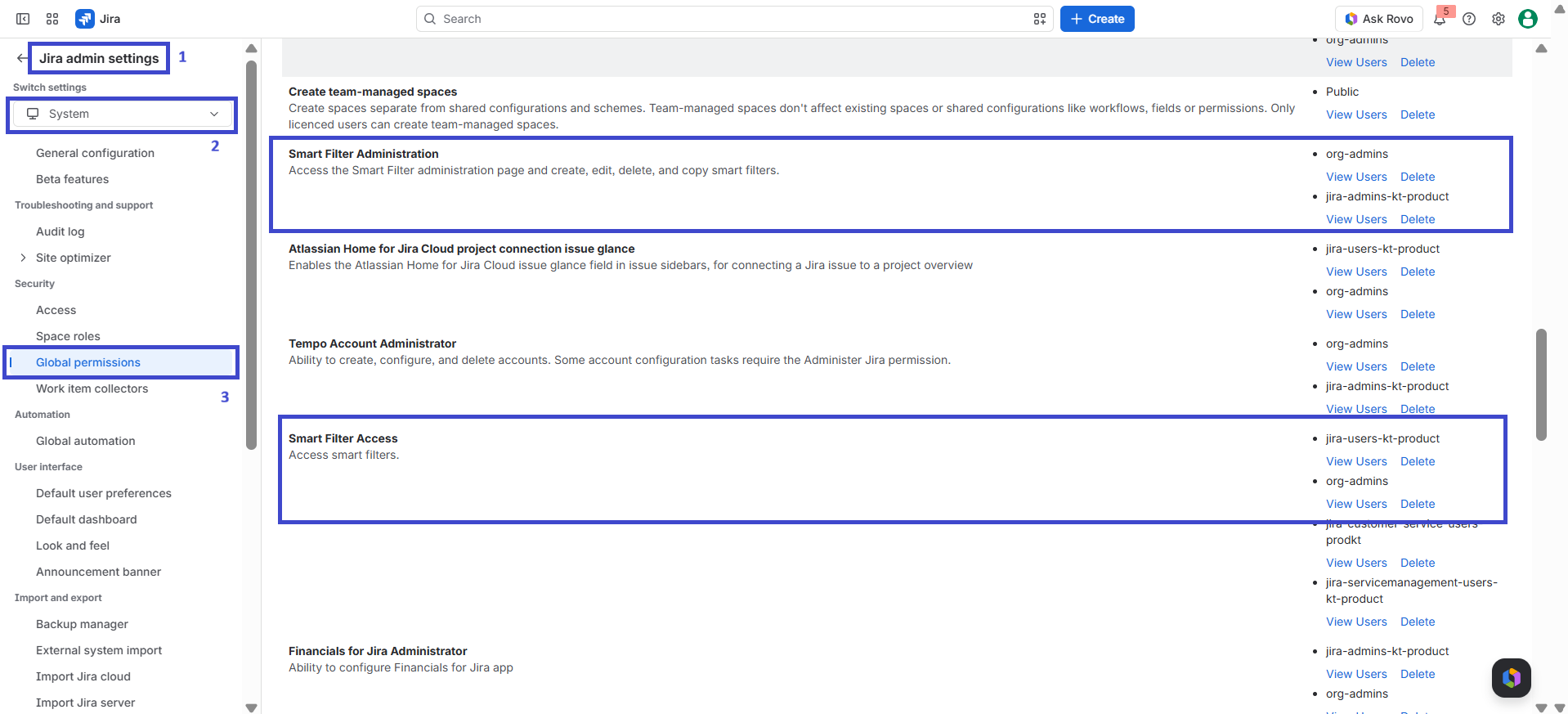
Give Smart Filter Administration to project leads or managers who maintain shared filters, and grant Smart Filter Access to general user groups who only need to view dashboards.