
Comment Toolbox for Jira Cloud provides a set of custom field types that turn comment activity into structured Jira data.
Once a field is created and added to the relevant work item screens, it automatically surfaces the corresponding comment information. These values can also be used in Jira searches and filters, making it easier to analyze comment activity across multiple work items.
Before you begin: If you have not created a Comment Toolbox custom field yet, see Getting Started for instructions on creating fields and adding them to work item screens.
Comment Activity Fields
Use these fields to understand how active a discussion is and when comment activity takes place.
|
Custom Field |
What It Shows |
Useful For |
|---|---|---|
|
JCT Comment Count |
Total number of comments on the work item. |
Finding highly discussed work items or work items with no comments. |
|
JCT First Comment Date |
Date of the first comment. |
Identifying when a discussion started. |
|
JCT Last Comment Date |
Date of the most recent comment. |
Monitoring recent activity or finding discussions that may have gone inactive. |
Example Insights
These fields can help answer questions such as:
-
Which work items have generated the most discussion?
-
Which work items have never received a comment?
-
Which discussions started recently?
-
Which work items have not received a new comment for a certain period?
Commenter Fields
Commenter fields make it possible to identify who started or most recently participated in a discussion.
|
Custom Field |
What It Shows |
Useful For |
|---|---|---|
|
JCT First Commenter |
User who added the first comment to the work item. |
Identifying who initiated the discussion. |
|
JCT Last Commenter |
User who added the most recent comment. |
Identifying the latest participant in the discussion. |
These fields are especially useful when you need to search across multiple work items based on who participated in their discussions.
For example, you can identify work items where the current user added the latest comment or find discussions initiated by members of a particular team.
Comment Content Fields
Use these fields when the content of the first or latest comment needs to be available as structured Jira field data.
|
Custom Field |
What It Shows |
Useful For |
|---|---|---|
|
JCT First Comment |
Content of the first comment on the work item. |
Quickly reviewing how a discussion started or searching first comments for specific information. |
|
JCT Last Comment |
Content of the most recent comment. |
Seeing the latest update without reviewing the complete comment history or searching recent comments for specific text. |
Display Options
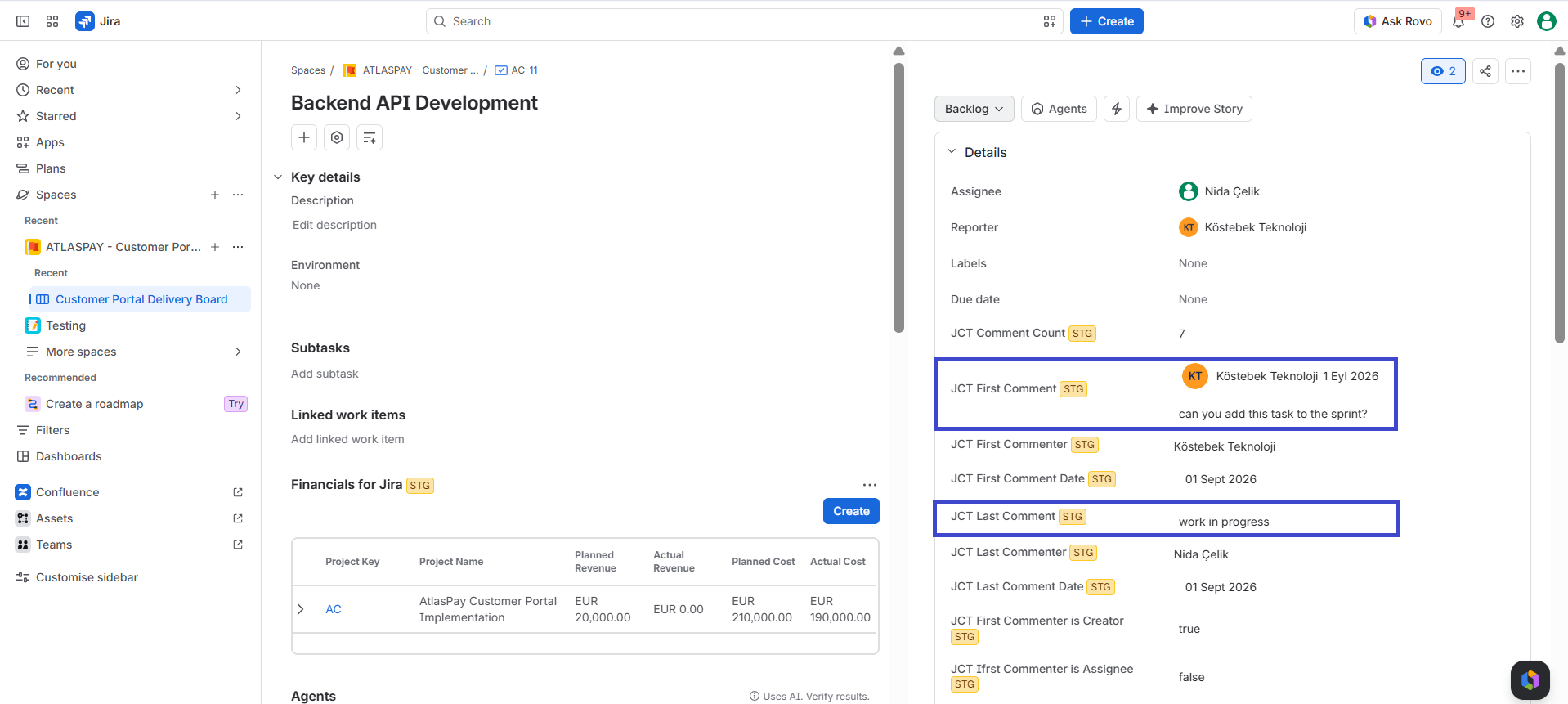
Comment content fields can be configured to include additional information together with the comment:
-
Comment Date
-
Commenter
This allows you to decide how much context should be displayed in the custom field.
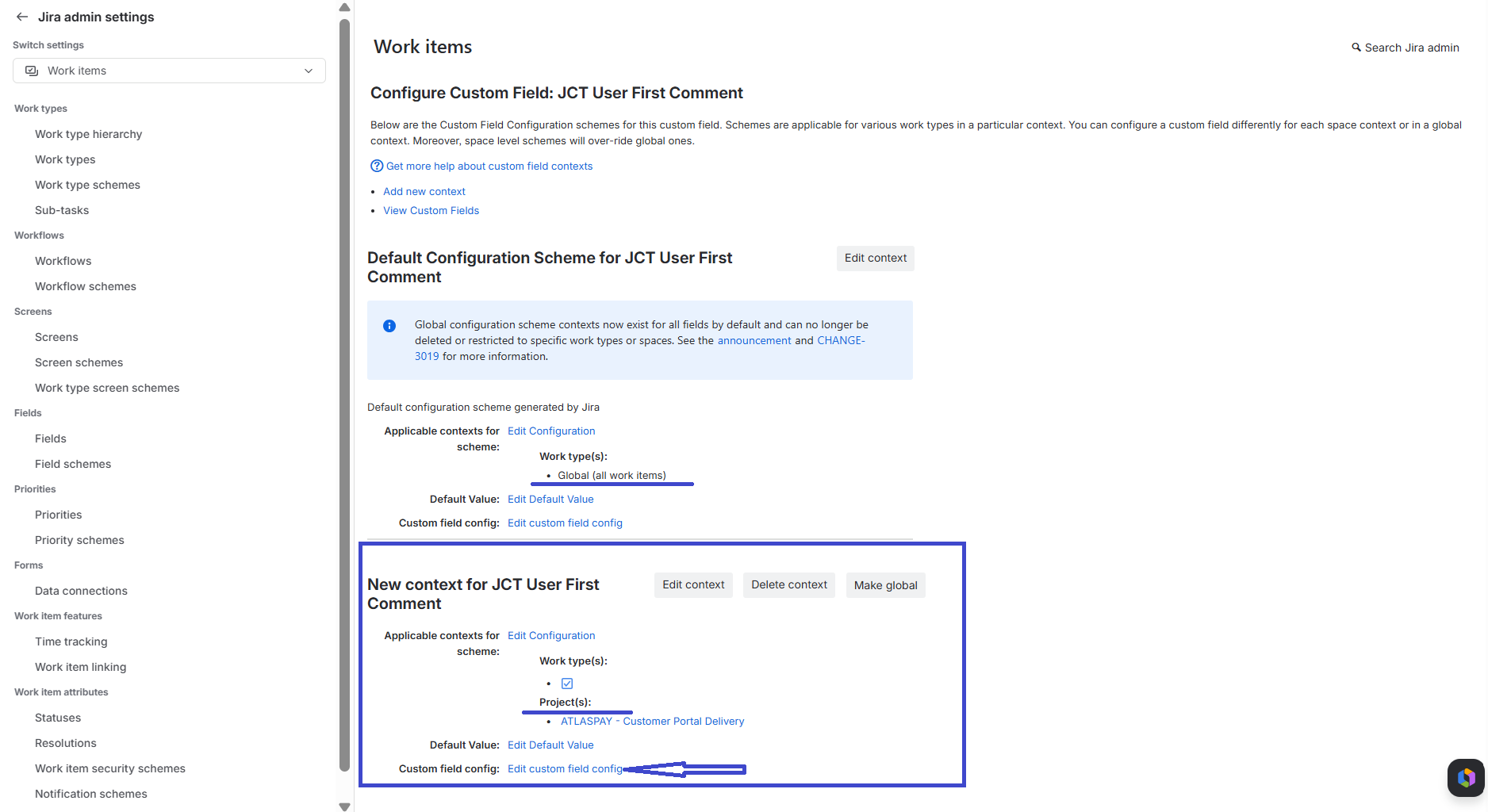
To configure the field:
-
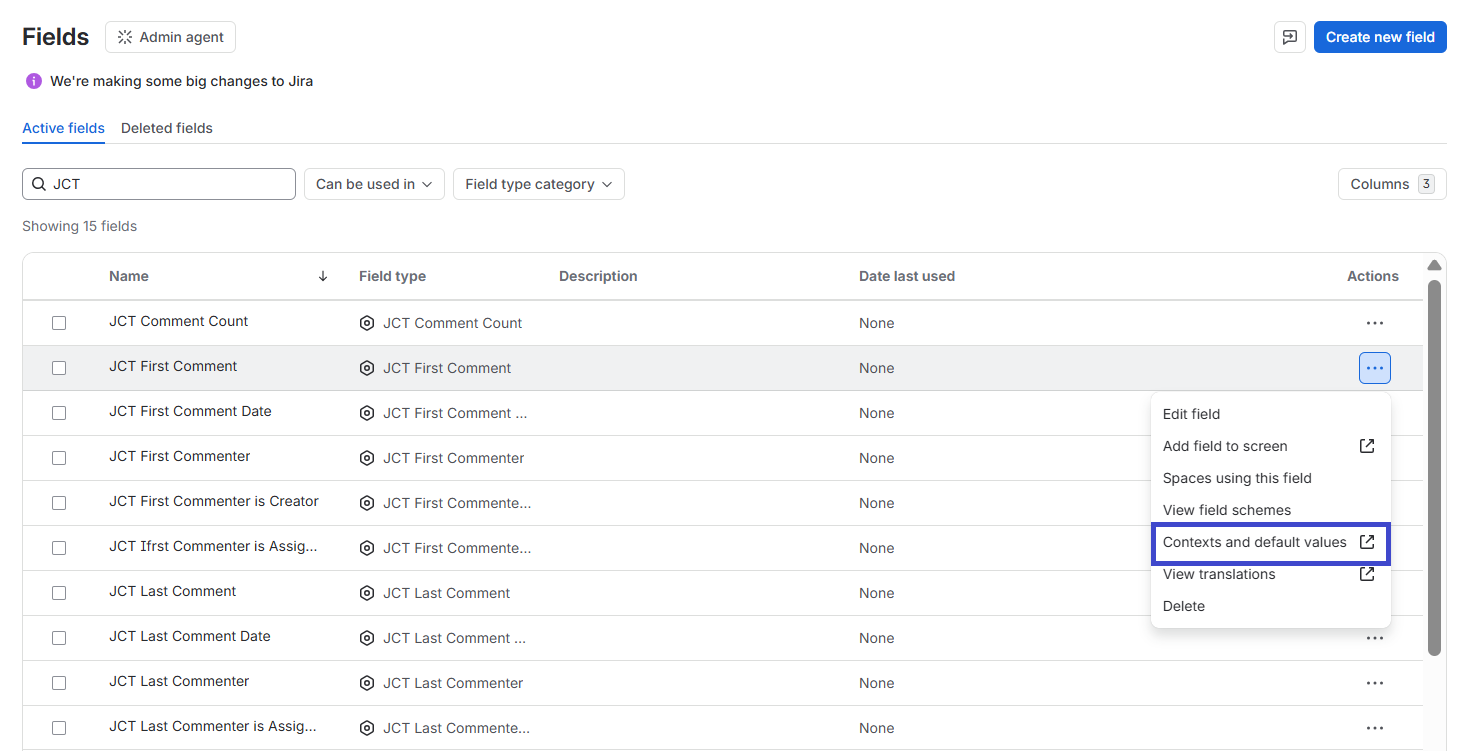
Go to Settings → Work items → Fields.
-
Find the JCT First Comment or JCT Last Comment field.
-
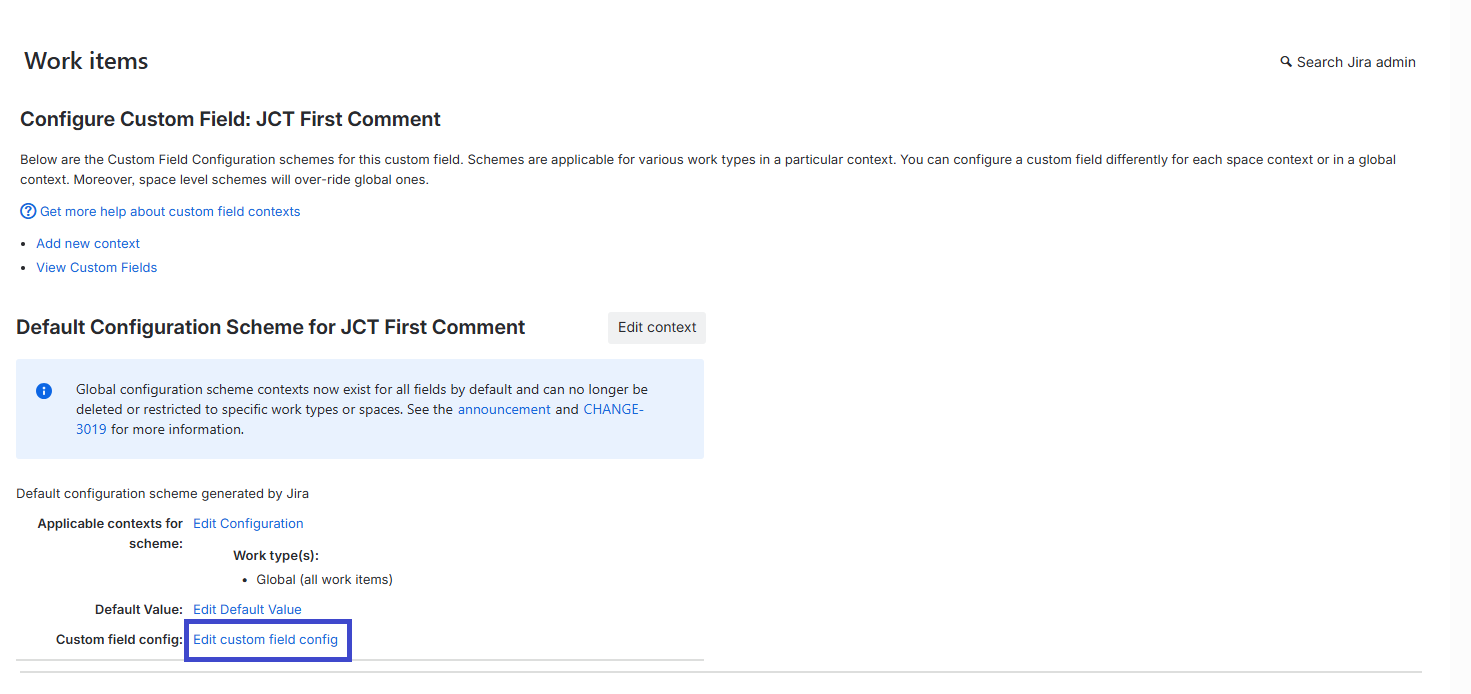
Select ••• → Contexts and default values.
-
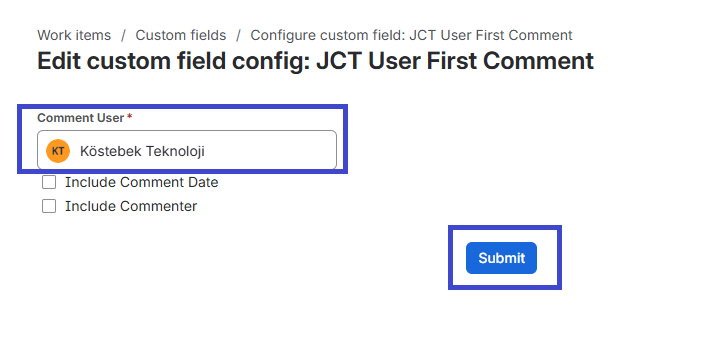
Under Custom field config, select Edit custom field config.
-
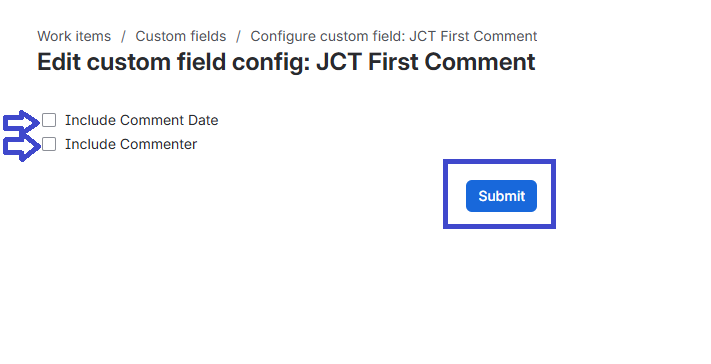
Choose the information you want to display:
-
Include Comment Date – displays when the comment was added.
-
Include Commenter – displays who added the comment.
-
-
Select Submit to save your configuration.
You can enable either option individually or select both to display the comment content, commenter, and comment date together.
User-Specific Comment Fields
User-specific fields allow you to focus on comments added by a particular configured user rather than the overall first or last comment on the work item.
|
Custom Field |
What It Shows |
Useful For |
|---|---|---|
|
JCT User First Comment |
First comment associated with the configured user. |
Finding the user's earliest contribution to a discussion. |
|
JCT User Last Comment |
Most recent comment associated with the configured user. |
Tracking the user's latest contribution across work items. |
The user is selected through the custom field configuration.
Depending on the field configuration, additional information such as the comment date and commenter can also be included in the displayed value.
Example Use Case
A team may configure a user-specific comment field for a support or review user. The field can then help identify that user's first or latest contribution across relevant work items without manually reviewing every comment thread.
Commenter and Work Item Role Fields
Comment Toolbox also provides fields that compare the first or last commenter with key Jira work item roles.
These fields make it easier to understand who is participating in the conversation in relation to the work item.
Assignee
|
Custom Field |
What It Checks |
|---|---|
|
JCT First Commenter is Assignee |
Whether the first commenter is also the current Assignee. |
|
JCT Last Commenter is Assignee |
Whether the last commenter is also the current Assignee. |
These fields can help identify whether the person responsible for the work item initiated or most recently participated in the discussion.
Creator
|
Custom Field |
What It Checks |
|---|---|
|
JCT First Commenter is Creator |
Whether the first commenter is also the Creator of the work item. |
|
JCT Last Commenter is Creator |
Whether the last commenter is also the Creator of the work item. |
These fields can help analyze how work item creators participate in discussions after creating the work item.
Reporter
|
Custom Field |
What It Checks |
|---|---|
|
JCT First Commenter is Reporter |
Whether the first commenter is also the Reporter. |
|
JCT Last Commenter is Reporter |
Whether the last commenter is also the Reporter. |
These fields indicate whether a reporter started or most recently responded to a discussion.
Each commenter and work item role fields value is true or false.
Why Use Role Fields?
Role-based fields can provide useful context without requiring users to compare commenters and work item roles manually.
For example, they can help you identify:
-
Work items where the assignee was the latest person to respond.
-
Discussions initiated by the reporter.
-
Work items where the creator participated first.
-
Conversations where the latest response came from someone other than the assignee.
Using Comment Toolbox Fields in JQL
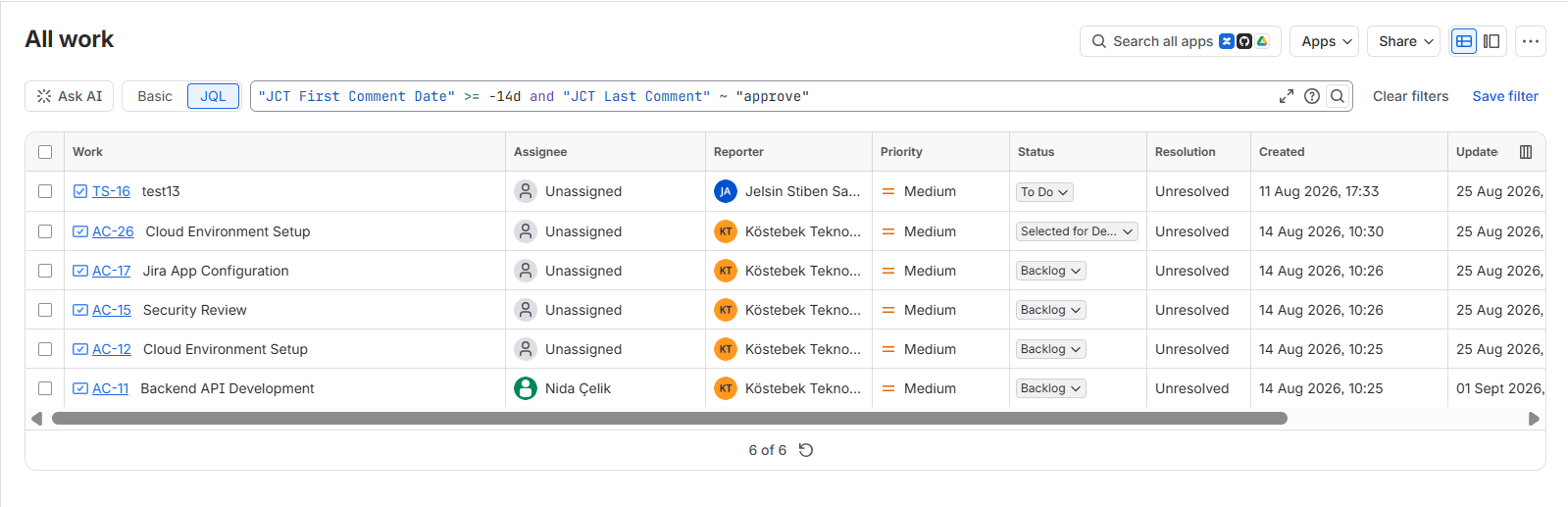
Comment Toolbox fields do more than display information on individual work items. Because comment information is exposed through Jira custom fields, it can also be used in JQL searches and Jira filters.
This allows comment activity to become part of your regular Jira search and analysis workflow.
The available JQL operators depend on the Comment Toolbox field type.
Search by Comment Count
Use JCT Comment Count to find work items based on the amount of discussion.
For example:
"JCT Comment Count" > 0
Finds work items that contain at least one comment.
You can also use the field to identify work items with unusually high discussion activity:
"JCT Comment Count" > 20
This can be useful for identifying complex work items, frequently discussed requests, or items that may require additional coordination.
Search by Commenter
Use JCT First Commenter or JCT Last Commenter to find work items based on who participated in the discussion.
For example:
"JCT First Commenter" = currentUser()
Finds work items where the current user added the first comment.
"JCT Last Commenter" = currentUser()
Finds work items where the current user is the most recent commenter.
Commenter fields can also be useful when building filters around individual users or groups.
Search by Comment Date
Date fields can help identify recent or inactive discussions.
For example:
"JCT Last Comment Date" >= -7d
Can be used to find work items with recent comment activity.
Date-based searches can help teams distinguish active conversations from work items where discussions may have gone quiet.
Search Comment Content
Comment content fields can be used to search for specific information contained in the first or latest comment.
For example:
"JCT Last Comment" ~ "approval"
This can help locate work items where the latest discussion contains a particular word or phrase without searching each comment thread manually.
Search by Commenter Role
Role fields can be used to filter work items based on whether the first or last commenter matches the Assignee, Creator, or Reporter.
For example, you may build filters to identify:
-
Work items where the Assignee was the last commenter.
-
Work items where the Reporter started the discussion.
-
Work items where the Creator was the latest commenter.
These searches can be especially useful for analyzing response patterns and understanding where a conversation currently stands.
Supported JQL operators vary depending on the selected Comment Toolbox field type.
|
Custom Field |
Field Type |
Supported Operators |
|---|---|---|
|
JCT Comment Count |
Number |
|
|
JCT First Commenter |
User |
|
|
JCT Last Commenter |
User |
|
|
JCT First Comment Date |
Date |
|
|
JCT Last Comment Date |
Date |
|
|
JCT First Comment |
String |
|
|
JCT Last Comment |
String |
|
|
JCT User First Comment |
String |
|
|
JCT User Last Comment |
String |
|
|
JCT First Commenter is Assignee |
Boolean |
|
|
JCT Last Commenter is Assignee |
Boolean |
|
|
JCT First Commenter is Creator |
Boolean |
|
|
JCT Last Commenter is Creator |
Boolean |
|
|
JCT First Commenter is Reporter |
Boolean |
|
|
JCT Last Commenter is Reporter |
Boolean |
|
Turn Comment Activity into Insights
Combining Comment Toolbox fields with Jira filters allows you to analyze comment activity across projects rather than reviewing discussions one work item at a time.
For example:
|
Question |
Useful Field |
|---|---|
|
Which work items generate the most discussion? |
JCT Comment Count |
|
Which discussions have been inactive recently? |
JCT Last Comment Date |
|
Who started the discussion? |
JCT First Commenter |
|
Who responded most recently? |
JCT Last Commenter |
|
What was the latest update? |
JCT Last Comment |
|
Did the assignee respond last? |
JCT Last Commenter is Assignee |
|
Did the reporter initiate the discussion? |
JCT First Commenter is Reporter |
|
What was a specific user's latest contribution? |
JCT User Last Comment |
You can save these searches as Jira filters and use them as part of your existing search, dashboard, reporting, and monitoring workflows.
With Comment Toolbox, comments become more than individual conversation threads - they become searchable and reusable Jira data that help teams identify activity patterns and gain insight across their work items.