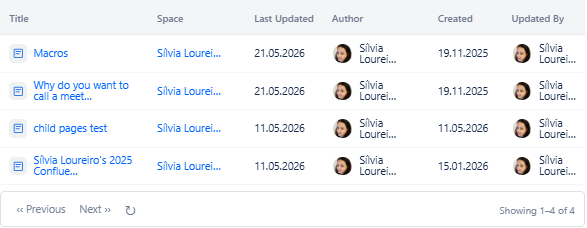
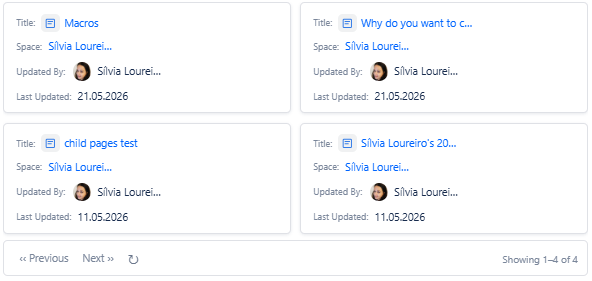
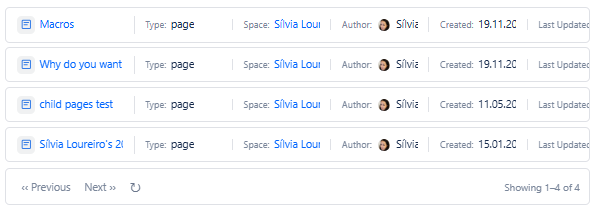
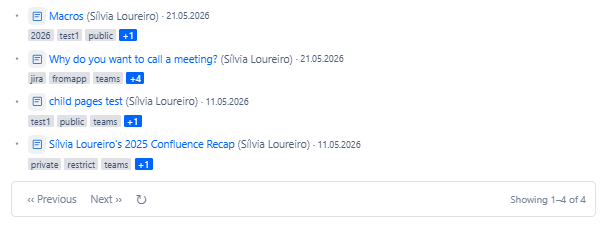
All four macros support the same four view modes. The view mode is selected on the Display tab.
|
Mode |
Visual style |
What it shows |
Best for |
|---|---|---|---|
|
Table |
Rows and columns with a header row |
Title, Space, Last Updated, Author. Columns are draggable to reorder. Each column can be shown or hidden individually. |
Dashboards, formal reports, structured content listings. |
|
Card |
Visual cards in a grid layout |
Title, excerpt, author avatar and name, last modified date. Supports 1, 2, or 3 columns per row. |
Team homepages, knowledge hubs, visual content discovery. |
|
Compact |
Dense two-line list |
Line 1: page title link. Line 2: metadata fields separated by dots (Space, Author, Last Modified, Created Date, Labels, Content Type). Optional excerpt on line 3. |
Sidebar widgets, related pages sections, high-density dashboards. |
|
Bullet |
Plain linked list |
Page title as a clickable link. Optional: date or space name shown after the link. |
Inline references, simple navigation lists, content inside table cells. |