
1. Update a Category
1.1. Prerequisites
User must have administrator permissions.
1.2. How to
To Update a Category in Financials for Jira:
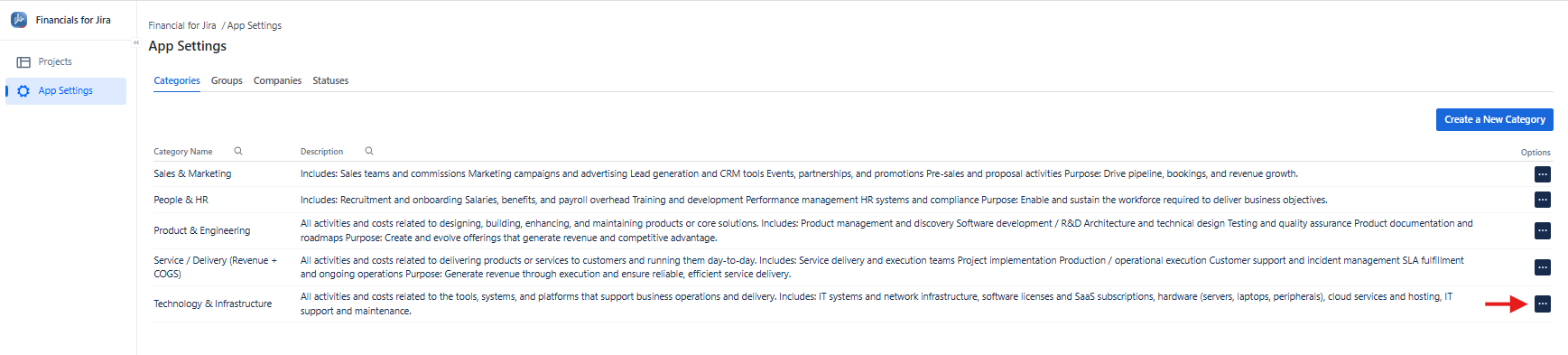
1.2.1. From the left-hand menu, click App Settings.
1.2.2. From the top menu, click Categories to open the list panel.
|
|---|
1.2.3. From the list, select the category you want to update by clicking the three-dot options menu.
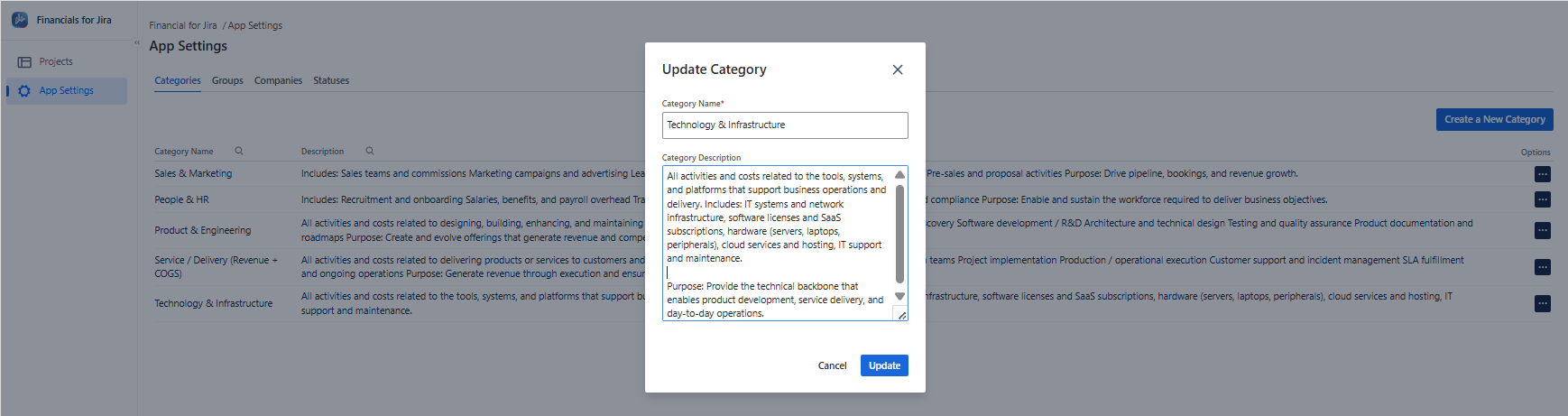
1.2.4. Here, you can make the necessary updates to the fields you require.
1.2.5. Finally, click the "Update" button to save your changes.
|
|---|
1.3. Constraints
When it comes to creating a Category , there are a few important considerations.
1.3.1. All mandatory fields must be completed to save the update.
1.3.2. The category name must be unique; a duplicate name will result in an error.
1.3.3. Only users with the appropriate permissions can update categories.
1.4. Issues that may arise
When you're attempting to Update a Category, there are a couple of potential issues that might come up.
1.4.1. Lack of administrator permissions will prevent Category updates.
1.4.2. Failing to complete mandatory fields will result in an error message.
1.4.3. Using a duplicate name will prevent the category from updating successfully.